The wait is over. The “next chapter” we talked about is now ready for you to explore.
A few days ago, we opened up about our vision for the future of Droip, a future defined by flow, speed, and a complete removal of the boundaries that hold creators back. Today, we are taking the first massive step toward that future.
The first Beta of the new Droip UX is now available.
This is the culmination of a year of R&D, a total reimagining of our UI, and the debut of the Infinite Canvas in WordPress.
Note: This is a Beta release. While the core capabilities are there, we recommend testing this on new projects or staging sites rather than your main production sites just yet.
What’s Inside This Beta?
We’ve focused this release on the core “creation experience.” We want you to feel the difference in your hands:
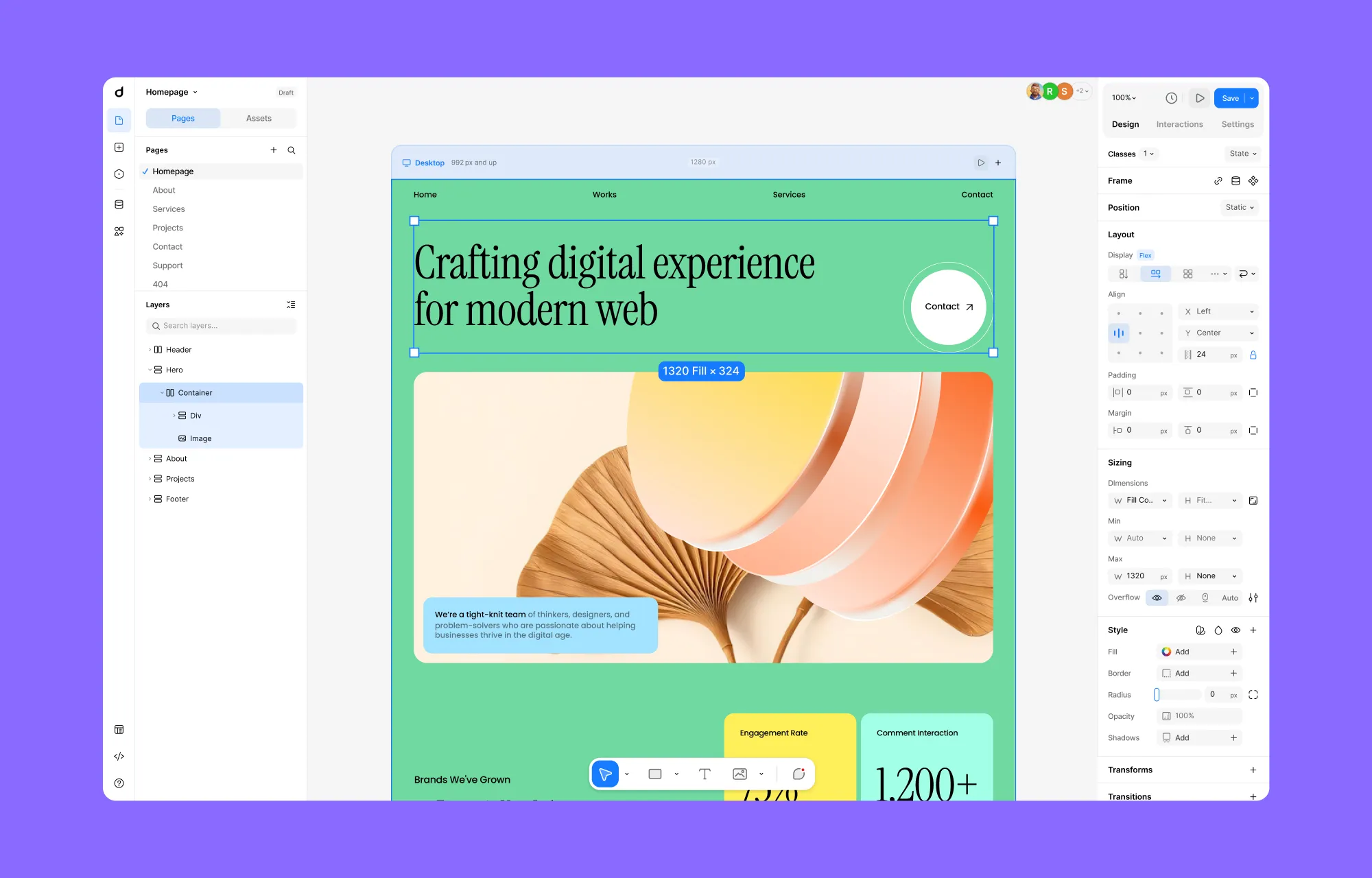
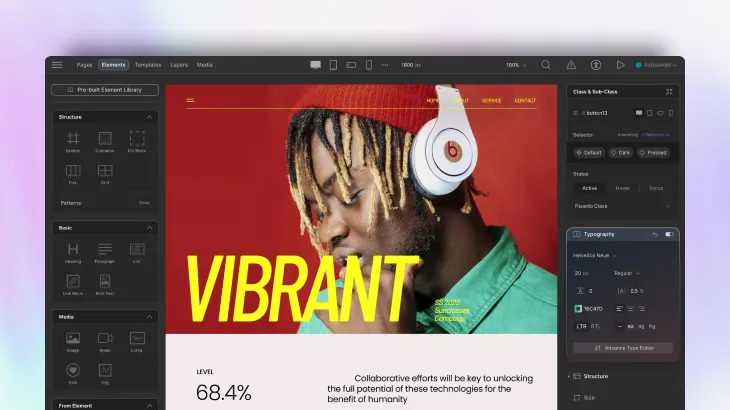
The Infinite Canvas: No more working in a box. Zoom out to see your entire project architecture; zoom in to pixel-perfect details.
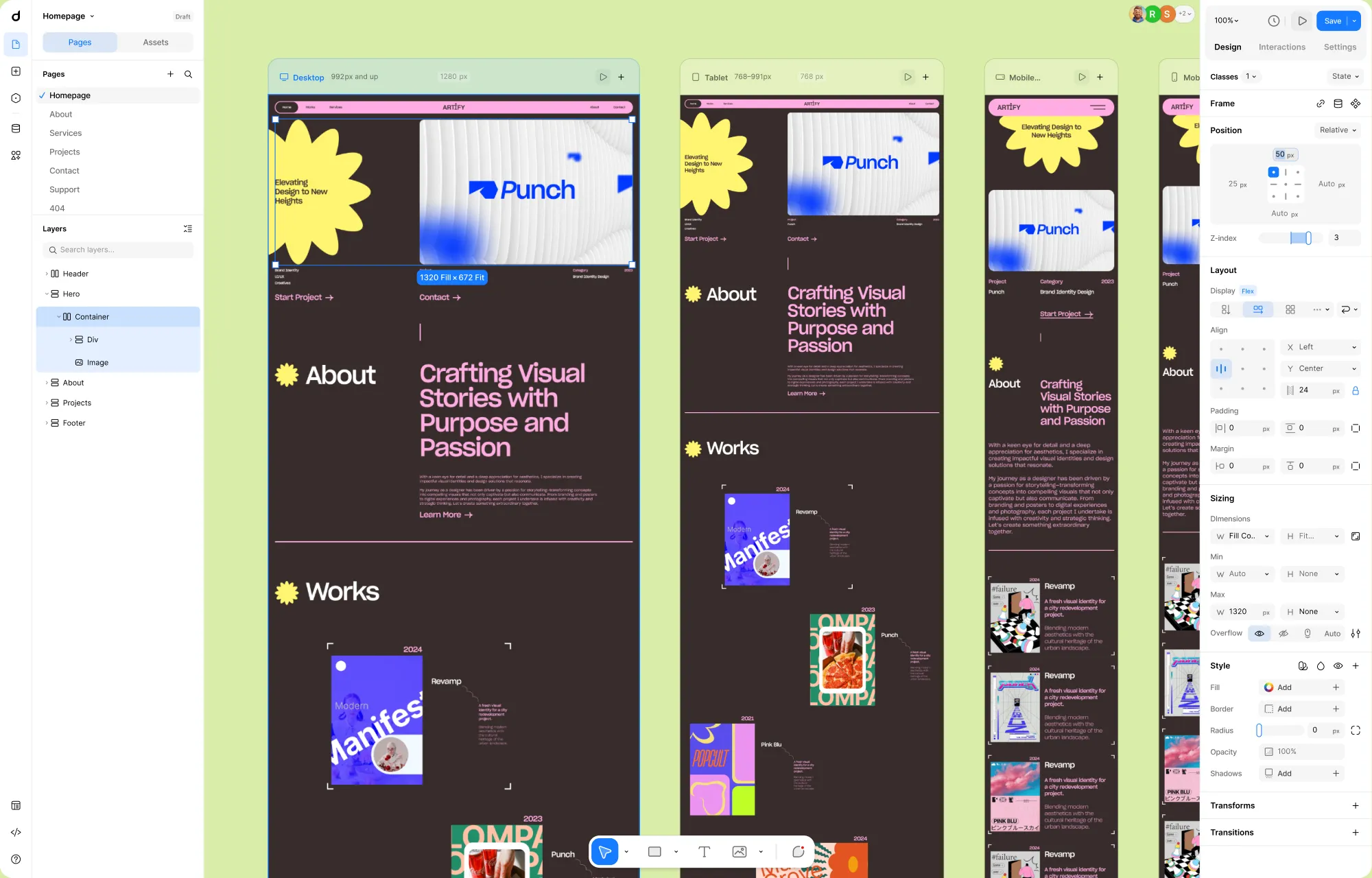
Side-by-Side Responsive Views: Build for mobile while looking at your desktop layout. No more toggling; just building.
Parallel Editing with Element Island: Experience the lack of friction when the Layers and Elements panels live together at the bottom of your screen.
A Cleaner and More Guided UI: See how much faster you can navigate complex projects when your navigation hub is always where you expect it to be.
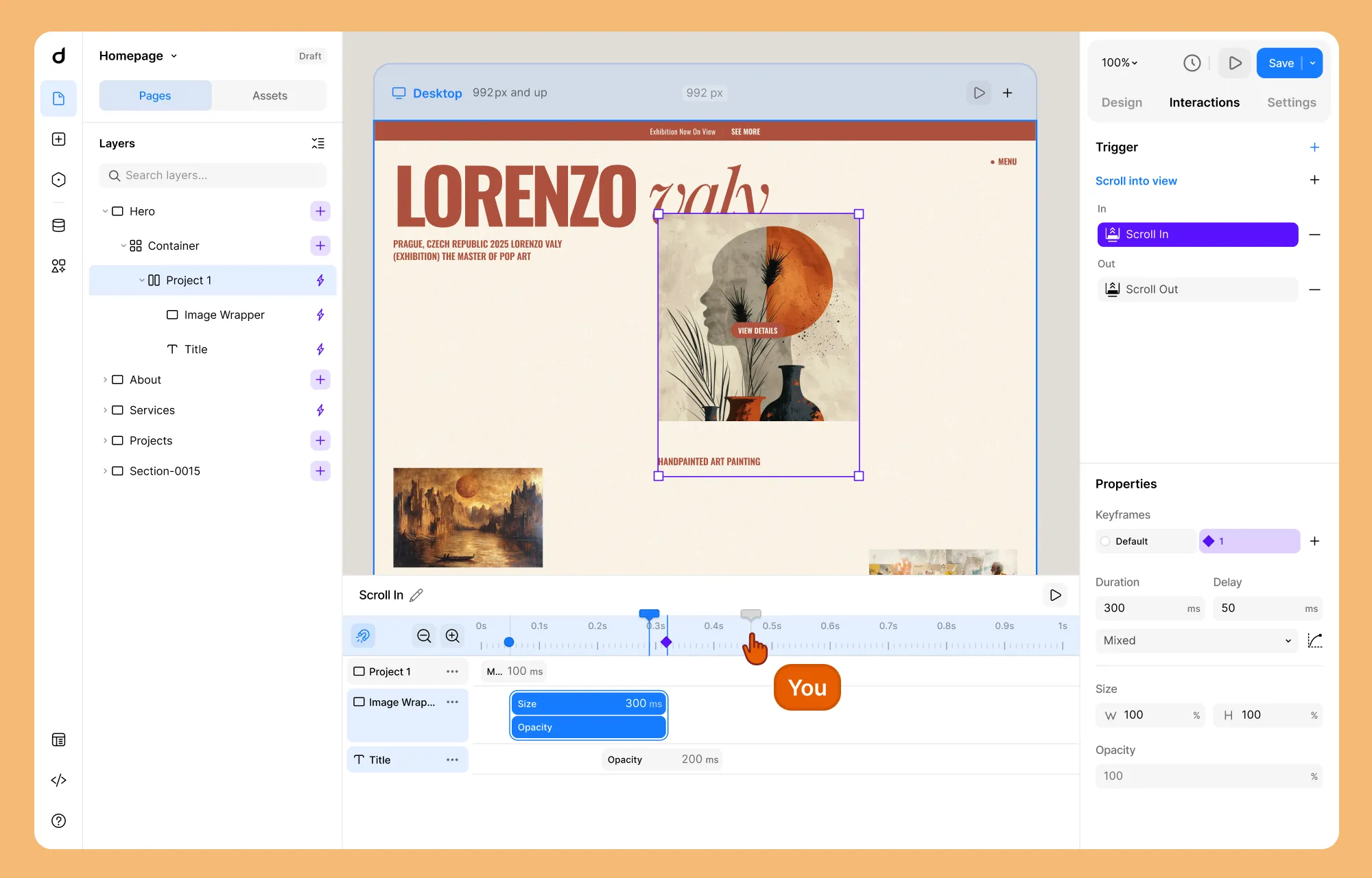
A Precision Interaction System: We’ve moved all interaction properties to their own dedicated tab. With the new Interaction Timeline, you can now bulk-edit items, group them to control timing as a unit, and use a playhead to scrub through your animations with total visual feedback.
If you want to revisit the psychology and design philosophy behind Droip’s next chapter, it’s worth a quick look before you dive into the Beta.
We Need Your Honest Feedback
We’ve worked incredibly hard on this new UX, but the real test happens in your workflow. We are releasing this as a Beta because we want your thoughts on the new editor.
We aren’t just looking for bugs; we’re looking to see if these changes are truly making a difference in your creative flow.
Download the Beta
To get your hands on the beta version, go to Droip.com and download the Beta from your dashboard. Free users can click the Free Trial button at the top right of the website to get access to the beta version.
We’re moving fast, and your feedback over the next few weeks will directly shape the final release.
The Journey Continues
Your support and excitement around the infinite canvas and simplified workflow gave our team the final push we needed to get this build ready.
Go ahead, zoom out, move freely, and tell us how it feels. The canvas is finally infinite!
We are bringing an infinite canvas, along with some other changes in Droip.
Before anything rolls out, let’s talk about what’s changing, why we’re doing it, and what it means for you. This is us being completely open about what we’ve learned over the past year and how we’re evolving Droip to better serve you.
Because if you’ve invested time, projects, and trust into Droip, you deserve to know exactly why we’re making these decisions.
Why We’re Making These Changes
It’s been over a year since we launched Droip 2.0. Since then, we shipped a ton of new features, nearly 100 ready-to-use templates, and built a growing community of creators using Droip every day.
As we continued to grow, we listened closely to your feedback. And a few things came up repeatedly:
Droip has a learning curve, and it’s not always obvious where to start.
People wanted a free version to explore before committing.
Finding Droip is harder than it should be. The name is constantly autocorrected to “Drop,” which hurts our search visibility.
These challenges forced us to pause and ask the big question:
How do we make Droip easier to learn, easier to find, and easier to get started with, without losing what makes it powerful?
The answer guided everything you’re about to see. We approached it from three directions:
Rebuilding the product experience so creation feels natural, visual, and intuitive.
Introducing a free version so anyone can explore Droip without barriers.
Rethinking our identity so people can actually discover us.
And this is why we’re making some of the biggest product and brand decisions since Droip began.
The New Creation Experience
To solve the learning curve and make building feel more natural, we’ve completely reimagined the Droip editor.
Infinite Canvas
Instead of working inside a fixed space, Droip is moving to an infinite canvas, a seemingly limitless canvas where you can build your website without feeling boxed in.
You can smoothly zoom in to get an overview and zoom out to work on details, move freely across your layout, and focus entirely on your work without constantly switching modes.
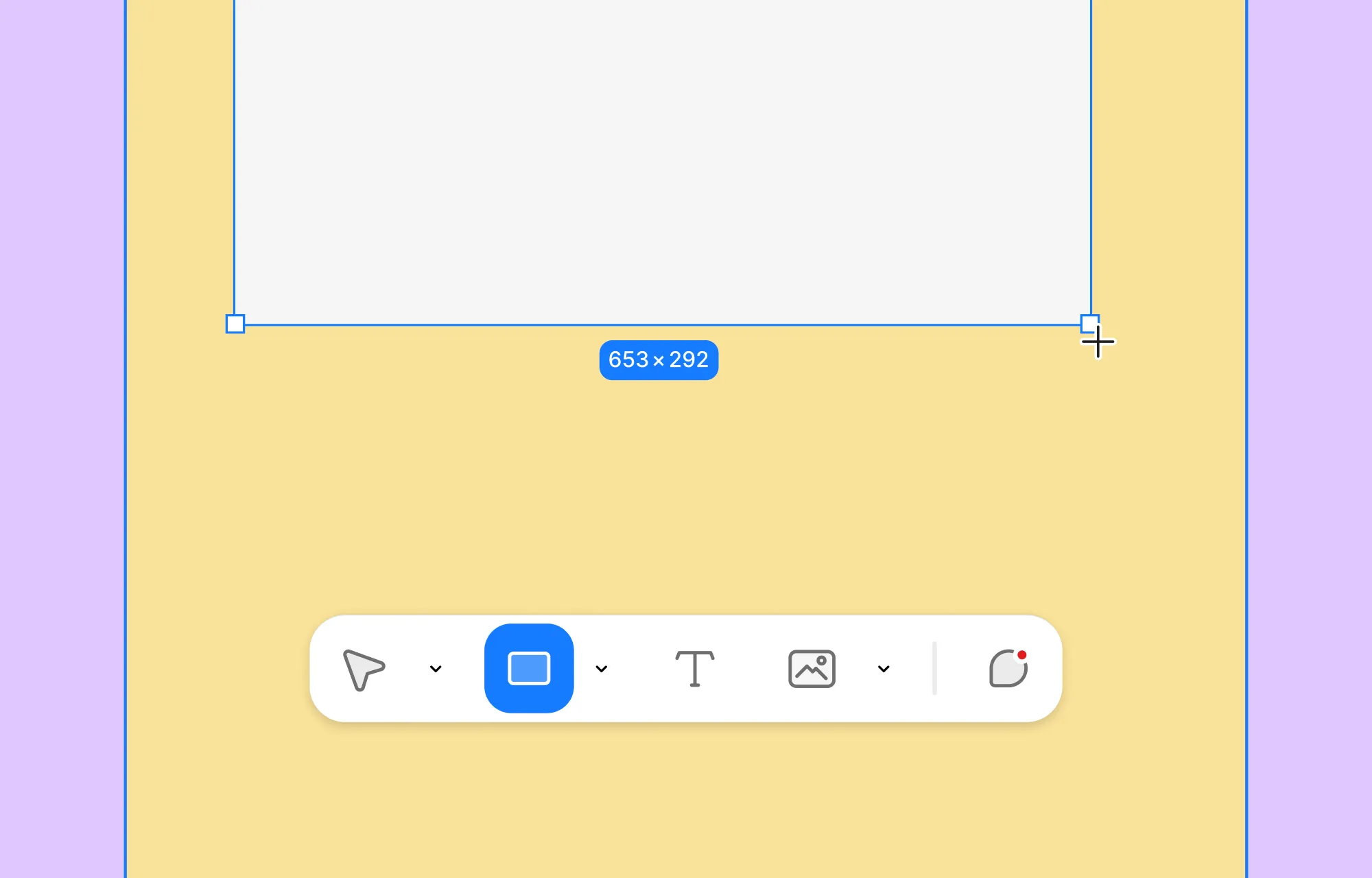
Things like padding, spacing, radius, and grid layouts can now be adjusted directly on the canvas, visually, with improved drag & drop controls.
All Responsive Views, Side by Side
One of the biggest shifts is that all responsive layouts now live on the canvas at the same time.
Instead of switching between desktop, tablet, and mobile modes, you can see every breakpoint side by side on the canvas.
You can compare layouts instantly, spot inconsistencies, and fine-tune responsiveness as part of your creative flow, not as a separate step at the end.
Element Island: Fewer Elements, Same Power
We replaced the old, bulky elements panel with Element Island, a lightweight creation layer that stays at the bottom of the canvas, where your attention already is. This will let you access the Elements and the Layers panel in parallel while creating layouts, drastically reducing the constant back-and-forth movement in sidebars.
The old editor had more than 30 elements. For many users, choosing where to start was harder than building itself.
We’ve reduced this to just five core elements – with the same capabilities as before, but simple enough that you don’t need to understand the entire system before creating your first layout.
A Cleaner, More Guided Interface
A major pain point in the previous editor was navigation.
We had Pages, Layers, and Symbols all living in different places. For complex projects, this added a lot of unnecessary mental load.
In the new interface, we’ve introduced a much clearer and more predictable structure.
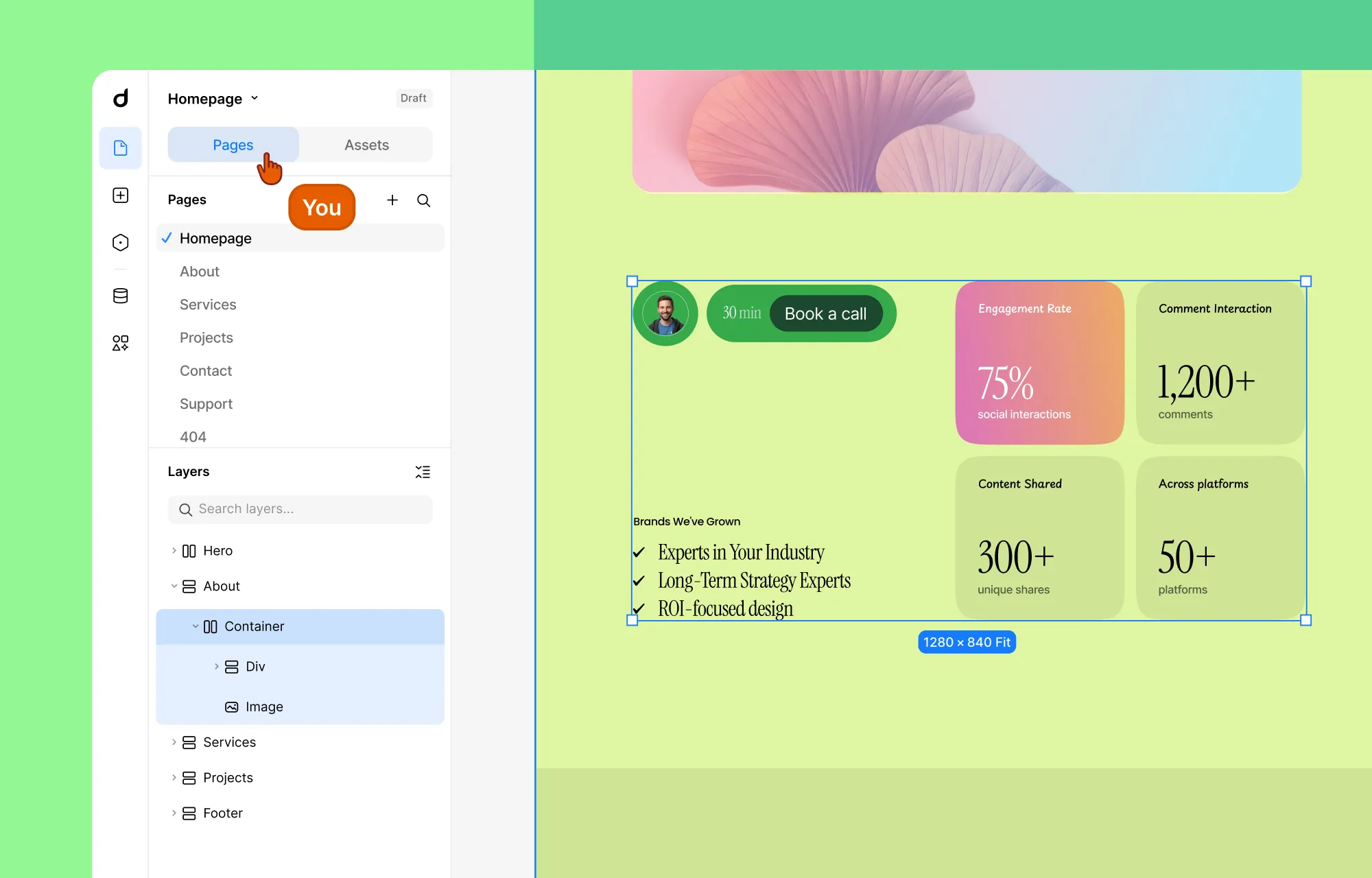
Pages and Layers now live together in a single panel called Pages. This panel is always open by default and acts as your main navigation hub inside Droip.
Symbols are now Components and live under Assets, as a tab inside the Pages panel. This gives you instant access to reusable elements without breaking your flow or opening yet another section of the UI.
Most importantly, Pages becomes the “home base” of the editor. If you open other panels like Variables, Dynamic Content, or Apps, pressing Escape will always bring you straight back to the Pages panel.
The result is an experience where you don’t feel lost or stuck inside the interface anymore.
A Better Way to Build Interactions
We also redesigned the entire interaction system around clarity, control, and visual feedback.
All interaction properties now live separately inside the Interaction tab on the right panel. The interaction timeline itself has been significantly upgraded. You can now:
Apply bulk actions across multiple timeline items
Group multiple items and control their Duration, Delay, and Curve as a single unit
Use a playhead to scrub through the sequence, previewing any specific moment in time
Add target elements more intuitively, with a customized layer panel that lets you select target layers visually.
What This Means for Your Existing Projects
This is probably the question on your mind right now.
No, your existing projects won’t suddenly break. The core capabilities of Droip remain intact. What’s changing is how you access and use them.
Some workflows will feel different. Certain panels are gone. Some features live in new places. But the intention isn’t to force you to relearn everything; it’s to remove the friction that made things harder than they needed to be.
Launching a Free Version on WordPress
Alongside the new editor, we’re also preparing something many of you have asked for: a free version of Droip.
Soon, anyone will be able to explore Droip’s core capabilities without restrictions. We’re planning to bring Droip to the WordPress plugin repository, making it easier than ever to discover and try.
Rest assured, the free version will be genuinely useful and powerful enough to build real websites. And when you start using Droip regularly, upgrading to Pro will feel like a natural next step, not a barrier.
Exploring a Rebranding for Droip
There’s one more thing we want to be open about. We’re currently exploring a possible rebrand for Droip.
As Droip has grown, we’ve started to run into a very real problem. We have been trying for three years to rank on search engines, but because the word “Droip” is constantly autocorrected to “Drop,” we have suffered a lot in terms of visibility. From a discoverability standpoint, it has been an uphill battle for people to find the product even when they’re actively looking for it.
Search visibility plays a huge role in whether a product can grow sustainably. At the same time, with the direction we’re heading and the capabilities we’re building, we need an identity that’s easier to find and more reflective of what the product can actually do.
The rebrand will be about aligning the name, the story, and the product for the next phase of our journey.
A Bold Future Awaits
Phew – that’s a lot of changes.
We know that reading about a new UI isn’t nearly as exciting as actually clicking through it. When the update goes live (expected by the end of February), the “why” behind these changes will become clear the moment you touch the canvas. We’re also aiming to roll out the free version and rebranding soon after that.
Our goal is to make building for the web feel like a flow state, not a struggle. Whether you’re a pro or a first-timer, you should be able to create something meaningful in five minutes with Droip.
That’s the future we’re building toward, and this next chapter is our commitment to that belief.
Building a WordPress site used to feel like a solo job, even when you had a team.
You’d take turns editing, swap logins, and hope no one overwrote someone else’s work.
Not anymore.
Introducing Droip’s Real-Time Collaboration – the most advanced multi-user co-editing experience ever built into a WordPress builder.
Your entire team can now design, edit, and review together, live, in the same canvas, without stepping on each other’s toes.
Work Together. Like, Really Together.
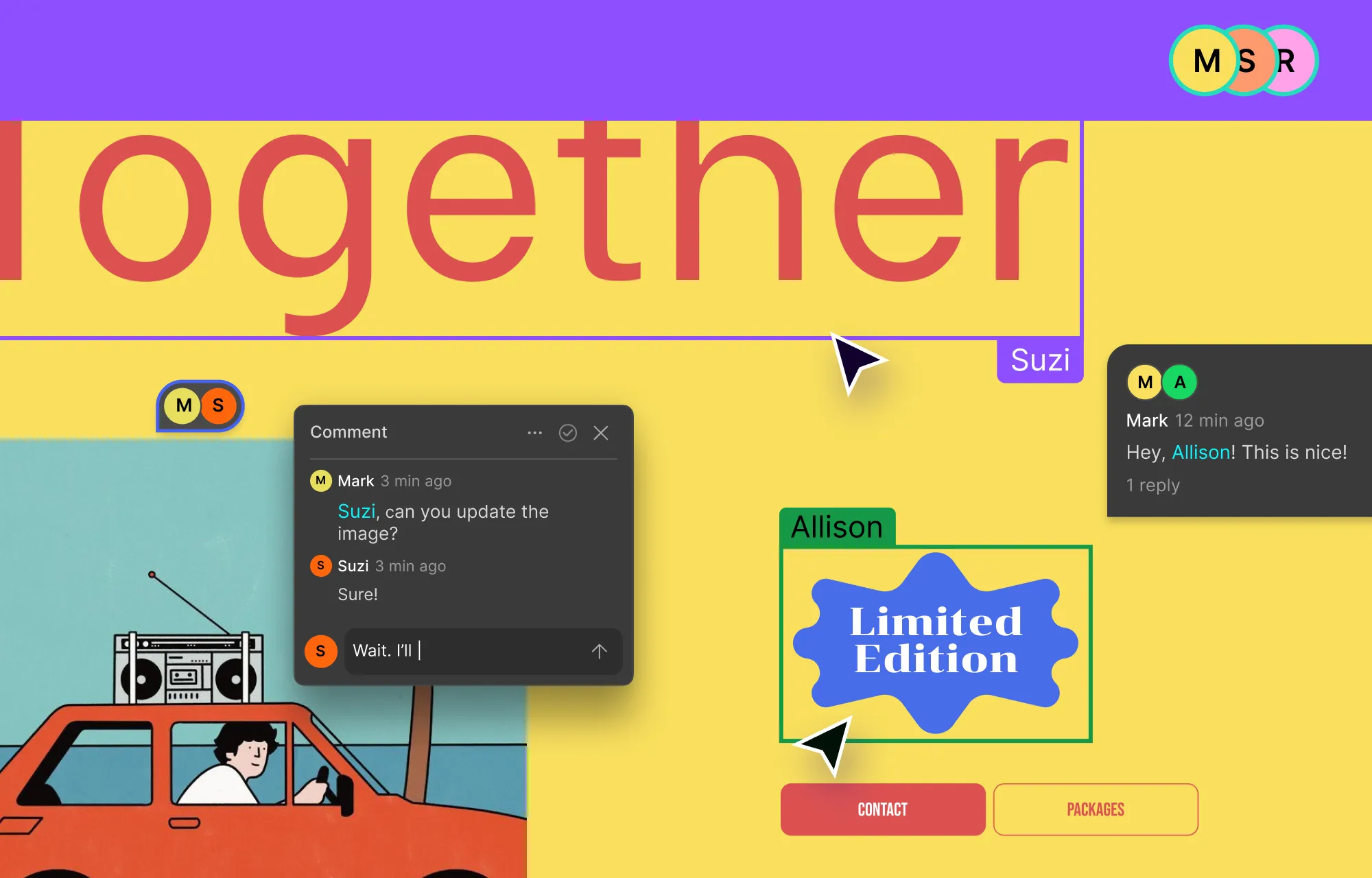
With Droip’s Real-Time Collaboration, multiple teammates can build on the same page at the same time, and every change appears instantly, just like Figma or Google Docs.
Real-Time Multi-User Editing
Imagine your whole team inside the same canvas, designers adjusting layouts, developers refining elements, content editors polishing copy, all at once.
No waiting turns or “who changed this?” moments.
With Droip, every move is visible in real time. You see color-coded highlights showing who’s working on what, and their icons appear at the top so you always know who’s in the room with you.
Every adjustment, whether it’s a layout shift or a quick text edit, syncs instantly in the visual editor. It feels less like taking turns on a project and more like being in the same room, building together.
In-Canvas Comments
Collaboration isn’t just about editing; it’s also about communicating. That’s why Droip brings an entire Collaboration Suite that also includes in-canvas comments to keep discussions tied to the exact elements they relate to.
With in-canvas comments, you can tag teammates to draw their attention to specific elements, keep the conversation tied to the exact spot it relates to, and resolve comments the moment they’re addressed.
Why Teams Will Love It
Droip’s Real-Time Collaboration turns scattered workflows into coordinated efforts. Every edit syncs instantly. Every idea is visible to the right people. Every version is safely stored.
From small teams to large agencies, designers to developers to content editors, everyone can finally work together on the same canvas, at the same time.
It’s more than co-editing. It’s teamwork, reimagined for WordPress.
Ever wished you could bring your Figma masterpieces straight to life? Well, now you can.
We’re bringing you Figma to Droip, a collaboration tool that bridges the gap between your favorite design software Figma, and the powerful no-code website builder, Droip.
Now, with just a simple copy and paste, you can transfer your beautifully designed website in Figma directly into Droip and watch it come to life as a fully functional website.
Bridging the Gap Between Design and Development
No more endless back-and-forth and roadblocks between design and development teams.
With a few clicks, your Figma design – complete with styles, spacing, and layouts – will appear within Droip’s intuitive interface.
All you have to do is install the plugin, copy the design, and simply paste it, that’s how simple it is.
Effortless Installation: Head over to Figma’s Resources tab and add the Figma to Droip plugin with a single click.
Seamless Import: With your Figma masterpiece complete (ideally using auto layout features), simply copy and paste it directly into Droip.
Refine & Launch: Breathe life into your design within Droip’s user-friendly environment. Add interactivity, personalize elements, and hit publish to showcase your creation to the world.
No tedious handoff processes and painstaking pixel-perfect replication, we promise you!
Figma to Droip Makes it Epic
The Figma to Droip integration empowers you in incredible ways:
Unprecedented Speed: Say goodbye to time-consuming handoffs and development delays. This integration dramatically accelerates your website creation process.
Enhanced Collaboration: Designers and developers can now work in perfect harmony. Designers see their creations come to life instantly, while developers appreciate the clean and well-structured code foundation generated in Droip.
Pixel-Perfect Accuracy: Eliminate the risk of discrepancies between design and development. Your website will look exactly as envisioned in Figma.
Focus on What Matters: Free yourself from tedious technical hurdles. This integration allows you to dedicate more time to refining your design and user experience.
Work Together, Create Together
The Figma to Droip integration is a game-changer for creative teams. It fosters collaboration, accelerates development, and empowers you to bring your website visions to life with unparalleled ease and efficiency.
Ready to experience the power of seamless design-to-development workflow? Install the Figma to Droip plugin now and get started!
Gone are the days of grappling with complex code or struggling with limited design options. Introducing Droip – a true no-code website builder for WordPress that’s set to change the way you design and create websites.
Let’s dive into the compelling reasons why Droip is the ultimate choice for unleashing your website’s full potential.
The Vision Behind Droip
Droip’s vision is rooted in simplicity. Our mission is to make website creation a breeze, allowing everyone, from professional designers to visionary entrepreneurs, to turn their ideas into reality. Unlike other website builders that claim to be no-code but still impose limitations, Droip offers a genuine no-code environment.
True No-Code Simplicity
With Droip, you’ll find an intuitive, user-friendly, and visual interface that empowers you to effortlessly design and customize every aspect of your website, from layout to functionality. The creative freedom offered by Droip is unmatched, all without the need to grapple with complex code or rely on a plethora of plugins.
Say Goodbye to Plugins Overload
Tired of dealing with a jumble of plugins for every little thing? From design to functionality, Droip provides almost all the tools required to craft unique and complex websites, eliminating the dependence on external plugins.
You get to enjoy the creative freedom of Droip without bloating your site with a plugin for every functionality.
Migrate Your WordPress Pages to Droip
Wondering how to edit your existing WordPress pages with Droip? We’ve got you covered!
Droip’s seamless migration feature effortlessly converts your current WordPress pages into Droip pages. With just a single click, all your content is seamlessly migrated, making your transition to Droip smooth and hassle-free.
Inclusive & Accessible Website Creation
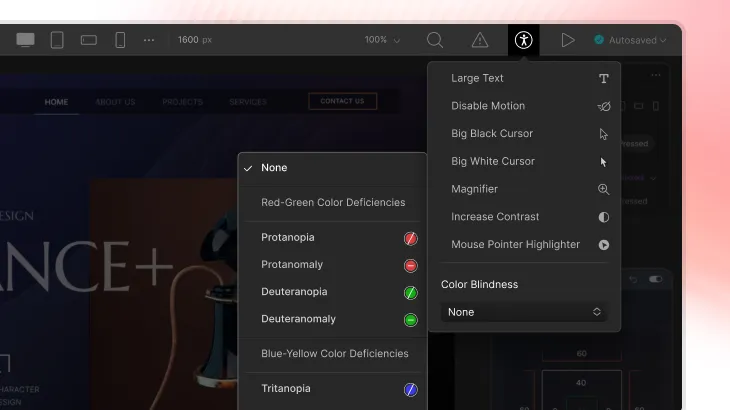
Personalize the Droip interface using Accessibility options and make your workspace just right for you! You can adjust settings to suit your comfort – turn off motions, improve color contrast, and tweak colors for those with visual challenges or color blindness.
Get convenient Keyboard Shortcuts to navigate around Droip. Along with making the platform accessible, Droip also ensures your website’s accessibility with features like alt text for images and the Contrast Ratio for Text Content.
Meticulously Crafted Elements Library
Droip comes with meticulously crafted elements, ensuring you have every building block you need to create captivating websites. From structuring your page with ease to adding media, forms, and dynamic components, the element library sparks boundless creativity.
You can also set unique properties for any element using the Custom Attributes feature and further stretch the functionality of your site.
Visually Design Interactive Website
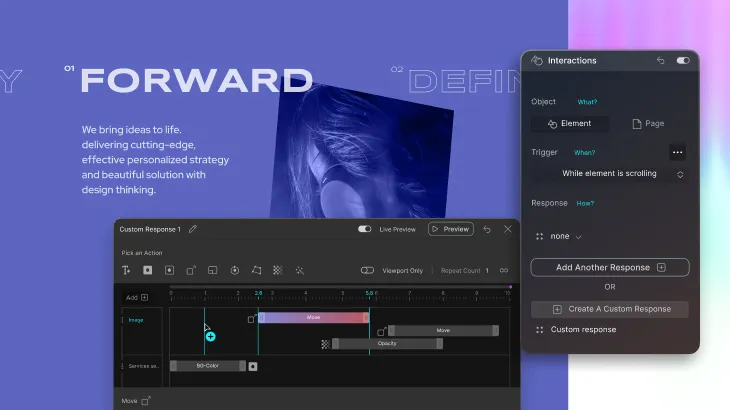
Make the website layout come to life by adding interactive animations triggered through various actions like on-click, on-hover, scrolling, etc.
Select from a variety of animations created using JS & CSS in Droip’s Animation Library, including Entrance, Exit, and Special Effects.
Not only that, you can also control their duration, start time, and even fine-tune their behavior using the Custom Timing Editor!
Responsive Brilliance With Unlimited Breakpoints
Droip ensures your website looks impeccable on any device with its responsive web design approach. Elevate user experience by making your website responsive for any screen size out there with the help of unlimited breakpoints. Choose from a plethora of popular pre-defined sizes or define your custom breakpoint if required.
Create Unique Websites With a World of Styling Wonders
Create a captivating website that leaves a lasting impression on users and entices them to return, all thanks to Droip’s dynamic features.
Incorporate captivating typography: Access an array of Google Fonts or upload your Custom Fonts to infuse your site with a unique visual charm.
Vibrant Backgrounds: Breathe life into your website’s design with Solid, Gradient, and Image Backgrounds. Choose from Linear, Radial, and Conic gradients for stunning color transitions. For Image Backgrounds, select from your media library and fine-tune size and position.
Enhance Depth With Stroke and Shadow: Define borders using Stroke, adjusting style, color, and radius. Employ inner and outer Shadows to impart depth and realism, tweaking parameters like distance, color, and blur.
Seamless Integration with Your Favorite Tools
Droip effortlessly integrates with your go-to tools and services!
Unsplash & Pexels: Tap into renowned image libraries like Unsplash and Pexels, offering high-quality free images for your website.
ReCAPTCHA: Enjoy the protective power of ReCAPTCHA, keeping your site safe from spam and ensuring genuine user interactions.
Mailchimp: Simplify email marketing by automating campaigns and tasks through Mailchimp integration.
ChatGPT: Generate text & web design effortlessly using Droip’s AI generator.
Get Pixel Perfect Precision
Precision is the key to a beautiful website. With Droip, achieving pixel-perfect precision is a breeze!
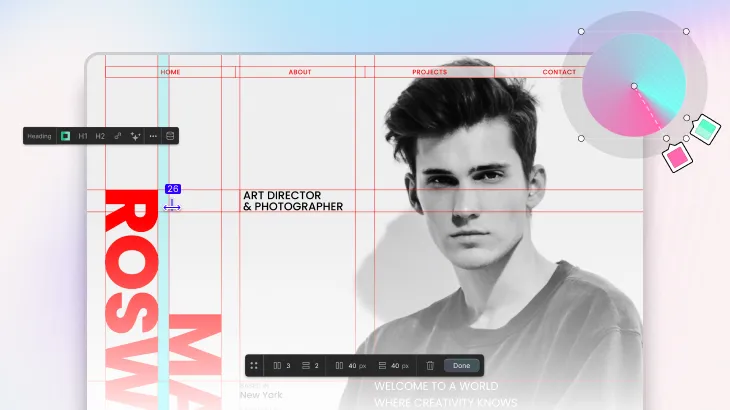
Place Perfectly with Guides: Droip’s intuitive Guide system offers pixel-perfect precision, making element placement and alignment a breeze.
Tailor Your Canvas How You Like: Canvas Controls grant you full autonomy to tailor your canvas to your desires. Adjust Canvas Scaling, enable Guides, activate Rulers, and more – all from this central hub.
User-Friendly Interface: Droip’s user interface is intentionally simple, ensuring website creation is as easy as pie.
Code or No-Code, It’s Your Call
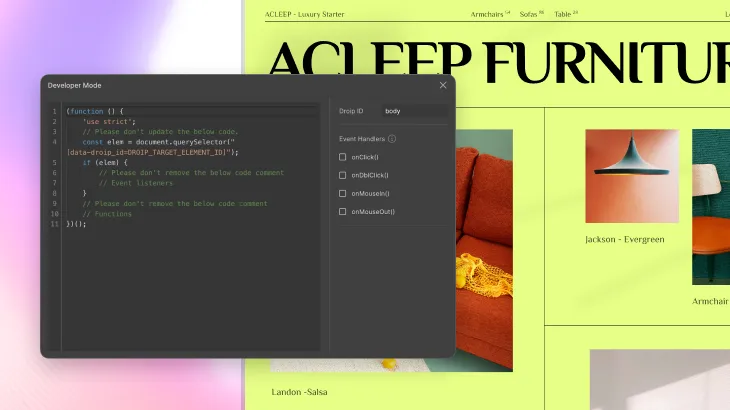
While Droip offers no-code simplicity, it doesn’t stifle your creativity. Advanced users can dive into the Dev Mode feature, integrating custom HTML, CSS, and JavaScript to achieve ultimate customization. The choice is yours – code or no code – Droip caters to all levels of expertise.
Plans for Every Purpose
Droip offers flexible pricing plans to suit diverse needs, ensuring value for everyone. Whether you’re a passionate blogger, an ambitious entrepreneur, or a dynamic agency, Droip’s cost-effective pricing scales with your requirements.
Experience unparalleled value with a platform that empowers you to create masterpieces without breaking the bank.
Embrace the No-Code Revolution in WordPress with Droip
Embrace the no-code revolution with Droip and experience the sheer power of effortless website creation. Say hello to intuitive design, powerful WordPress integration, AI content generation, and responsive brilliance – all at your fingertips.
The future of web design is here to redefine how you create websites on WordPress. Unleash your website’s full potential with Droip – the game-changing no-code WordPress builder. It’s time to create, captivate, and conquer the digital realm with Droip by your side.
Our website uses cookies to improve your browsing experience on our website. By continuing to use this website, you
agree to
their use. For details, please check our Privacy Policy.
Get started for free!
Start 90 days free trial!
Get Droip
Experience the power of Droip. Create stunning, responsive sites with pure creative freedom.